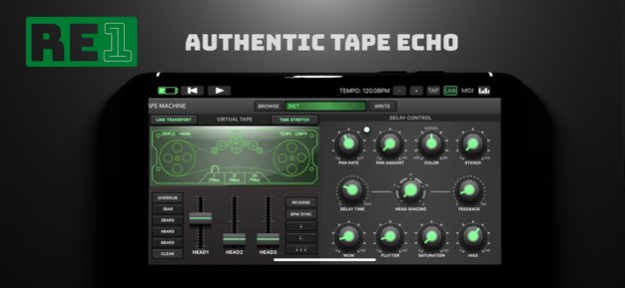
About RE-1 Tape Machine
RE-1 - Tape Echo RE-1 is a full featured virtual Tape Machine capable of delivering authentic tape based echo and chorus effects but it doesn't stop there. With it's interactive tape player, sample, loop and overdub...
RE-1 - Tape Echo RE-1 is a full featured virtual Tape Machine capable of delivering authentic tape based echo and chorus effects but it doesn't stop there. With it's interactive tape player, sample, loop and overdub features it's possible to use it like a virtual tape recorder, sample player, looper or simply as a master effect. Overview: - Virtual Tape deck including 3 individually controllable read heads, variable delay time and feedback - Interactive user interface and realtime visualisation of various parameters related to the tape simulation - Dedicated controls for Wow, Flutter, Color, Tape Hiss & saturation amount - Tape Loop mode with overdub, tape reverse and time-stretching - Sample/Loop library loads wave files onto the virtual tape loop - Transport and Tempo Sync - Stereo Spread & Stereo Panner - Input processing: Highpass filter - Output processing: 2 band eq Tape Echo: - Authentic tape echo emulation - Multi-tap delay with 3 individually controllable read heads - Color Control adjusts the echo's tone from dark to bright - Delay Time: 5ms - 1000ms (or 1/32th to 1/1) - Wow & Flutter - Tape Hiss and Saturation - Stereo spread - Stereo panner Looper / Sample Player: - Uses the tape like a traditional looper with unlimited overdubs - Configurable Loop length with 1 - 8 bars and tempo sync and tape reverse - Tape transport can be linked to the host's transport controls - Time stretching keeps loops in sync - Samples/loops can be loaded onto the tape directly - Samples can be created from the tape loop and stored in the sample library at any time - Factory content includes a variety of loops grouped by style - Samples/loops can be imported from and exported to other apps Connectivity: - Standalone - AUv3 - InterApp-Audio - Audiobus - Ableton Link - MIDI (Tempo, CC, Program Change) - Requirements: - iOS 11+
Version History - Fixed an issue where loading multiple instances in Cubasis would cause some instances to stop running 1.2.0 Jun 28 - Fixed an issue where the audio engine would fail to initialize when running the standalone app on iPhone 1.1.8 04/29/2024 - Fixed an issue where the plugin would not work properly when running on iOS17 - Standalone: Added options for selecting Input/Output channels when using a multi channel audio interface - Standalone: Fixed an issue where microphone input would not work properly on some iPad models - Minor Visual Tweaks 1.1.7 01/05/2024 - Fixed an issue where patches would not load when running on iOS14 1.1.5 09/22/2020 - Active Sample/Loop is now stored in a preset - Added Settings for controlling delay time knob and touch reel sensitivity - Tweaked time control response - Improved fullscreen layout - Changed IAA/AB name to match the AUv3 name - Changed the slider touch tracking from an absolute to a relative type which feels less direct but allows more accurate control - Fixed an issue where the tape loope export dialogue would not scale properly when using the AUv3 in fullscreen mode - Fixed an issue where loading the "Looper" preset would cause the plugin to crash - Fixed an issue where leaving and returning to the standalone app would cause the UI layout to change on some devices - Fixed an issue where samples created from within the app would me missing the sample rate information causing them to play improperly in other apps - Fixed an issue where continuously resizing the AUv3 could generate UI glitches in some cases 1.1.4 05/02/2020 1.1.3 (153) - Fixed an issue where assigning a parameter to AUM's main control would not restore properly when loading an AUM session - Fixed an issue where the tape loop export dialoge would not display the waveform properly - Fixed an issue where iOS13 gestures were interfering with controls in the loop export dialogue - Fixed an issue where the standalone version would not restore the last loaded preset after restarting the app - Fixed an issue where using the level sliders in loop mode could cause audible artifacts - Tweak control ranges - Tweaked label size and color for better readability - Minor visual tweaks 1.1.3 03/12/2020 - Added support for direct sample import via document picker - Added support for MIDI transport control (start/stop) - Fixed an issue where setting the tempo below 30bpm while looping would cause a crash in both, standalone and AUv3 mode. - Fixed an issue where on iPhone info popovers could not be closed - Fixed an issue where the app would crash when accessing the sample library on a device running iOS11 or older. 1.1.1 11/16/2018 - Universal: added iPhone support - UI: Added "What's new" dialogue - UI: Added Sample export dialoge with options for applying a crossfade at the loop point and adjusting sample volume before writing it to disk - UI: added info mode - when enabled, tapping any control will bring up a description of it's function as well as suggestions on how to use it - UI: added support for drag n drop import/export of samples (works in Standalone and AU) - Optimizations: improved drawing performance - Optimizations: decreased install size - Looping: When overdub is engaded, feedback only affects output from the second and third playback heads (this change was made to avoiding high pitched artifacts caused by modulating a delay time of 0hz) - Fixed an issue where importing .wav files using uncommon format headers would crash the app or create static - Fixed an issue where "link transport" and "time-stretch" buttons would not toggle properly - Fixed an issue where restoring an ApeMatrix session with RE-1 inside would crash the plugin - Fixed an issue where using wireless headphones would result in low quality mono audio - Fixed an issue where changing the host tempo would cause time-streching to be calculated based on the previous, not the updated tempo - Fixed an issue where loading the app in Garagageband would cause a crash (only relates to IAA, not AUv3) - Fixed an issue where time-stretching would only be applied to samples loaded from audio files but not live recordings - Fixed an issue where the right channel would behave differnetly from the left when applyin feedback in overdub mode 1.1 10/18/2018 1.0.2 (122) - UI: Rewritten all animations for better performance - UI: improved 12.9 inch UI - UI: Tweaked slider touch tracking - Standalone app now mutes audio input if it detects a feedback loop during startup - Standalone can now be used with wireless headphones - Clear Tape can now be MIDI mapped - Settings: Added option to toggle transport lag (disable it to have the tape transport react to changes immediately) - Settings: Added option to toggle the simulation of electrical noise and mains hum - Looping: Enabling overdub now sets the first tape head fixed at 0 delay, 2nd and 3rd head continue to work like before - Looping: Tape deck start/stop animations now take transport lag into account as configured in the settings - Samples: User generated samples are now in stereo (2ch 16bit wav) - Bufix: Fixed an issue where loading certain samples could crash the app - Bugfix: Fixed an issue where controls using exponential scaling would be excluded from parameter list in AUM - Bugfix: Fixed an issue where connecting via Audiobus/IAA would fail to start the audio engine if RE-1 was running already - Bugfix: Fixed an issue where cubasis automation would record but not play back - Bugfix: Fixed an issue where the stereo dial would have no effect if overdub was engaded and only the first tape head active - Bugfix: Fixed an issue where setting to input volume to 0 would also affect the dry signal when mixed at the output - Bugfix: Fixed an issue where user samples created in the standalone version would not be available in AU and vice versa - Bugfix: Fixed an issue where imported samples would not be available when running in AU mode - Bugfix: Fixed an issue where toggling transport link would not start the tape animation if necesaryy - Bugfix: Fixed an issue where setting the loop length to 1 bar would result in a 2 bar loop - Bugfix: Fixed an issue where transport sync would not work with hosts that don't transmit timeline information such as Audiobus or ApeMatrix - Bugfix: Fixed an issue where imported samples would not show until application restart - Bugfix: Fixed an issue where previously saved loops would playback with a gap when loaded again - iOS9+ support 1.0.2 09/15/2018 - Added an option to select whether or not tape and host transport controls are linked - Added an option to select whether changing tempo and loop length applies time stretching to the tape loop's contents - Minor visual tweaks 1.0.1 08/22/2018 1.0 08/22/2018
Previous Versions
Here you can find the changelog of RE-1 Tape Machine since it was posted on our website on 2021-12-16 20:50:45.
The latest version is 1.2.0 and it was updated on 2026-10-12 20:29:29. See below the changes in each version.
RE-1 Tape Machine version 1.2.0
Updated At: 2026-10-08
Changes: Version History - Fixed an issue where loading multiple instances in Cubasis would cause some instances to stop running 1.2.0 Jun 28 - Fixed an issue where the audio engine would fail to initialize when running the standalone app on iPhone 1.1.8 04/29/2024 - Fixed an issue where the plugin would not work properly when running on iOS17
- Standalone: Added options for selecting Input/Output channels when using a multi channel audio interface
- Standalone: Fixed an issue where microphone input would not work properly on some iPad models
- Minor Visual Tweaks 1.1.7 01/05/2024 - Fixed an issue where patches would not load when running on iOS14 1.1.5 09/22/2020 - Active Sample/Loop is now stored in a preset
- Added Settings for controlling delay time knob and touch reel sensitivity
- Tweaked time control response
- Improved fullscreen layout
- Changed IAA/AB name to match the AUv3 name
- Changed the slider touch tracking from an absolute to a relative type which feels less direct but allows more accurate control
- Fixed an issue where the tape loope export dialogue would not scale properly when using the AUv3 in fullscreen mode
- Fixed an issue where loading the "Looper" preset would cause the plugin to crash
- Fixed an issue where leaving and returning to the standalone app would cause the UI layout to change on some devices
- Fixed an issue where samples created from within the app would me missing the sample rate information causing them to play improperly in other apps
- Fixed an issue where continuously resizing the AUv3 could generate UI glitches in some cases 1.1.4 05/02/2020 1.1.3 (153)
- Fixed an issue where assigning a parameter to AUM's main control would not restore properly when loading an AUM session
- Fixed an issue where the tape loop export dialoge would not display the waveform properly
- Fixed an issue where iOS13 gestures were interfering with controls in the loop export dialogue
- Fixed an issue where the standalone version would not restore the last loaded preset after restarting the app
- Fixed an issue where using the level sliders in loop mode could cause audible artifacts
- Tweak control ranges
- Tweaked label size and color for better readability
- Minor visual tweaks 1.1.3 03/12/2020 - Added support for direct sample import via document picker
- Added support for MIDI transport control (start/stop)
- Fixed an issue where setting the tempo below 30bpm while looping would cause a crash in both, standalone and AUv3 mode.
- Fixed an issue where on iPhone info popovers could not be closed
- Fixed an issue where the app would crash when accessing the sample library on a device running iOS11 or older. 1.1.1 11/16/2018 - Universal: added iPhone support
- UI: Added "What's new" dialogue
- UI: Added Sample export dialoge with options for applying a crossfade at the loop point and adjusting sample volume before writing it to disk
- UI: added info mode - when enabled, tapping any control will bring up a description of it's function as well as suggestions on how to use it
- UI: added support for drag n drop import/export of samples (works in Standalone and AU)
- Optimizations: improved drawing performance
- Optimizations: decreased install size
- Looping: When overdub is engaded, feedback only affects output from the second and third playback heads (this change was made to avoiding high pitched artifacts caused by modulating a delay time of 0hz)
- Fixed an issue where importing .wav files using uncommon format headers would crash the app or create static
- Fixed an issue where "link transport" and "time-stretch" buttons would not toggle properly
- Fixed an issue where restoring an ApeMatrix session with RE-1 inside would crash the plugin
- Fixed an issue where using wireless headphones would result in low quality mono audio
- Fixed an issue where changing the host tempo would cause time-streching to be calculated based on the previous, not the updated tempo
- Fixed an issue where loading the app in Garagageband would cause a crash (only relates to IAA, not AUv3)
- Fixed an issue where time-stretching would only be applied to samples loaded from audio files but not live recordings
- Fixed an issue where the right channel would behave differnetly from the left when applyin feedback in overdub mode 1.1 10/18/2018 1.0.2 (122)
- UI: Rewritten all animations for better performance
- UI: improved 12.9 inch UI
- UI: Tweaked slider touch tracking
- Standalone app now mutes audio input if it detects a feedback loop during startup
- Standalone can now be used with wireless headphones
- Clear Tape can now be MIDI mapped
- Settings: Added option to toggle transport lag (disable it to have the tape transport react to changes immediately)
- Settings: Added option to toggle the simulation of electrical noise and mains hum
- Looping: Enabling overdub now sets the first tape head fixed at 0 delay, 2nd and 3rd head continue to work like before
- Looping: Tape deck start/stop animations now take transport lag into account as configured in the settings
- Samples: User generated samples are now in stereo (2ch 16bit wav)
- Bufix: Fixed an issue where loading certain samples could crash the app
- Bugfix: Fixed an issue where controls using exponential scaling would be excluded from parameter list in AUM
- Bugfix: Fixed an issue where connecting via Audiobus/IAA would fail to start the audio engine if RE-1 was running already
- Bugfix: Fixed an issue where cubasis automation would record but not play back
- Bugfix: Fixed an issue where the stereo dial would have no effect if overdub was engaded and only the first tape head active
- Bugfix: Fixed an issue where setting to input volume to 0 would also affect the dry signal when mixed at the output
- Bugfix: Fixed an issue where user samples created in the standalone version would not be available in AU and vice versa
- Bugfix: Fixed an issue where imported samples would not be available when running in AU mode
- Bugfix: Fixed an issue where toggling transport link would not start the tape animation if necesaryy
- Bugfix: Fixed an issue where setting the loop length to 1 bar would result in a 2 bar loop
- Bugfix: Fixed an issue where transport sync would not work with hosts that don't transmit timeline information such as Audiobus or ApeMatrix
- Bugfix: Fixed an issue where imported samples would not show until application restart
- Bugfix: Fixed an issue where previously saved loops would playback with a gap when loaded again
- iOS9+ support 1.0.2 09/15/2018 - Added an option to select whether or not tape and host transport controls are linked
- Added an option to select whether changing tempo and loop length applies time stretching to the tape loop's contents
- Minor visual tweaks 1.0.1 08/22/2018 1.0 08/22/2018
RE-1 Tape Machine version 1.2.0
Updated At: 2026-06-29
Changes: Version History - Fixed an issue where loading multiple instances in Cubasis would cause some instances to stop running 1.2.0 1d ago - Fixed an issue where the audio engine would fail to initialize when running the standalone app on iPhone 1.1.8 04/29/2024 - Fixed an issue where the plugin would not work properly when running on iOS17
- Standalone: Added options for selecting Input/Output channels when using a multi channel audio interface
- Standalone: Fixed an issue where microphone input would not work properly on some iPad models
- Minor Visual Tweaks 1.1.7 01/05/2024 - Fixed an issue where patches would not load when running on iOS14 1.1.5 09/22/2020 - Active Sample/Loop is now stored in a preset
- Added Settings for controlling delay time knob and touch reel sensitivity
- Tweaked time control response
- Improved fullscreen layout
- Changed IAA/AB name to match the AUv3 name
- Changed the slider touch tracking from an absolute to a relative type which feels less direct but allows more accurate control
- Fixed an issue where the tape loope export dialogue would not scale properly when using the AUv3 in fullscreen mode
- Fixed an issue where loading the "Looper" preset would cause the plugin to crash
- Fixed an issue where leaving and returning to the standalone app would cause the UI layout to change on some devices
- Fixed an issue where samples created from within the app would me missing the sample rate information causing them to play improperly in other apps
- Fixed an issue where continuously resizing the AUv3 could generate UI glitches in some cases 1.1.4 05/02/2020 1.1.3 (153)
- Fixed an issue where assigning a parameter to AUM's main control would not restore properly when loading an AUM session
- Fixed an issue where the tape loop export dialoge would not display the waveform properly
- Fixed an issue where iOS13 gestures were interfering with controls in the loop export dialogue
- Fixed an issue where the standalone version would not restore the last loaded preset after restarting the app
- Fixed an issue where using the level sliders in loop mode could cause audible artifacts
- Tweak control ranges
- Tweaked label size and color for better readability
- Minor visual tweaks 1.1.3 03/12/2020 - Added support for direct sample import via document picker
- Added support for MIDI transport control (start/stop)
- Fixed an issue where setting the tempo below 30bpm while looping would cause a crash in both, standalone and AUv3 mode.
- Fixed an issue where on iPhone info popovers could not be closed
- Fixed an issue where the app would crash when accessing the sample library on a device running iOS11 or older. 1.1.1 11/16/2018 - Universal: added iPhone support
- UI: Added "What's new" dialogue
- UI: Added Sample export dialoge with options for applying a crossfade at the loop point and adjusting sample volume before writing it to disk
- UI: added info mode - when enabled, tapping any control will bring up a description of it's function as well as suggestions on how to use it
- UI: added support for drag n drop import/export of samples (works in Standalone and AU)
- Optimizations: improved drawing performance
- Optimizations: decreased install size
- Looping: When overdub is engaded, feedback only affects output from the second and third playback heads (this change was made to avoiding high pitched artifacts caused by modulating a delay time of 0hz)
- Fixed an issue where importing .wav files using uncommon format headers would crash the app or create static
- Fixed an issue where "link transport" and "time-stretch" buttons would not toggle properly
- Fixed an issue where restoring an ApeMatrix session with RE-1 inside would crash the plugin
- Fixed an issue where using wireless headphones would result in low quality mono audio
- Fixed an issue where changing the host tempo would cause time-streching to be calculated based on the previous, not the updated tempo
- Fixed an issue where loading the app in Garagageband would cause a crash (only relates to IAA, not AUv3)
- Fixed an issue where time-stretching would only be applied to samples loaded from audio files but not live recordings
- Fixed an issue where the right channel would behave differnetly from the left when applyin feedback in overdub mode 1.1 10/18/2018 1.0.2 (122)
- UI: Rewritten all animations for better performance
- UI: improved 12.9 inch UI
- UI: Tweaked slider touch tracking
- Standalone app now mutes audio input if it detects a feedback loop during startup
- Standalone can now be used with wireless headphones
- Clear Tape can now be MIDI mapped
- Settings: Added option to toggle transport lag (disable it to have the tape transport react to changes immediately)
- Settings: Added option to toggle the simulation of electrical noise and mains hum
- Looping: Enabling overdub now sets the first tape head fixed at 0 delay, 2nd and 3rd head continue to work like before
- Looping: Tape deck start/stop animations now take transport lag into account as configured in the settings
- Samples: User generated samples are now in stereo (2ch 16bit wav)
- Bufix: Fixed an issue where loading certain samples could crash the app
- Bugfix: Fixed an issue where controls using exponential scaling would be excluded from parameter list in AUM
- Bugfix: Fixed an issue where connecting via Audiobus/IAA would fail to start the audio engine if RE-1 was running already
- Bugfix: Fixed an issue where cubasis automation would record but not play back
- Bugfix: Fixed an issue where the stereo dial would have no effect if overdub was engaded and only the first tape head active
- Bugfix: Fixed an issue where setting to input volume to 0 would also affect the dry signal when mixed at the output
- Bugfix: Fixed an issue where user samples created in the standalone version would not be available in AU and vice versa
- Bugfix: Fixed an issue where imported samples would not be available when running in AU mode
- Bugfix: Fixed an issue where toggling transport link would not start the tape animation if necesaryy
- Bugfix: Fixed an issue where setting the loop length to 1 bar would result in a 2 bar loop
- Bugfix: Fixed an issue where transport sync would not work with hosts that don't transmit timeline information such as Audiobus or ApeMatrix
- Bugfix: Fixed an issue where imported samples would not show until application restart
- Bugfix: Fixed an issue where previously saved loops would playback with a gap when loaded again
- iOS9+ support 1.0.2 09/15/2018 - Added an option to select whether or not tape and host transport controls are linked
- Added an option to select whether changing tempo and loop length applies time stretching to the tape loop's contents
- Minor visual tweaks 1.0.1 08/22/2018 1.0 08/22/2018
RE-1 Tape Machine version 1.1.8
Updated At: 2026-06-02
Changes: Version History - Fixed an issue where the audio engine would fail to initialize when running the standalone app on iPhone 1.1.8 04/29/2024 - Fixed an issue where the plugin would not work properly when running on iOS17
- Standalone: Added options for selecting Input/Output channels when using a multi channel audio interface
- Standalone: Fixed an issue where microphone input would not work properly on some iPad models
- Minor Visual Tweaks 1.1.7 01/05/2024 - Fixed an issue where patches would not load when running on iOS14 1.1.5 09/22/2020 - Active Sample/Loop is now stored in a preset
- Added Settings for controlling delay time knob and touch reel sensitivity
- Tweaked time control response
- Improved fullscreen layout
- Changed IAA/AB name to match the AUv3 name
- Changed the slider touch tracking from an absolute to a relative type which feels less direct but allows more accurate control
- Fixed an issue where the tape loope export dialogue would not scale properly when using the AUv3 in fullscreen mode
- Fixed an issue where loading the "Looper" preset would cause the plugin to crash
- Fixed an issue where leaving and returning to the standalone app would cause the UI layout to change on some devices
- Fixed an issue where samples created from within the app would me missing the sample rate information causing them to play improperly in other apps
- Fixed an issue where continuously resizing the AUv3 could generate UI glitches in some cases 1.1.4 05/02/2020 1.1.3 (153)
- Fixed an issue where assigning a parameter to AUM's main control would not restore properly when loading an AUM session
- Fixed an issue where the tape loop export dialoge would not display the waveform properly
- Fixed an issue where iOS13 gestures were interfering with controls in the loop export dialogue
- Fixed an issue where the standalone version would not restore the last loaded preset after restarting the app
- Fixed an issue where using the level sliders in loop mode could cause audible artifacts
- Tweak control ranges
- Tweaked label size and color for better readability
- Minor visual tweaks 1.1.3 03/12/2020 - Added support for direct sample import via document picker
- Added support for MIDI transport control (start/stop)
- Fixed an issue where setting the tempo below 30bpm while looping would cause a crash in both, standalone and AUv3 mode.
- Fixed an issue where on iPhone info popovers could not be closed
- Fixed an issue where the app would crash when accessing the sample library on a device running iOS11 or older. 1.1.1 11/16/2018 - Universal: added iPhone support
- UI: Added "What's new" dialogue
- UI: Added Sample export dialoge with options for applying a crossfade at the loop point and adjusting sample volume before writing it to disk
- UI: added info mode - when enabled, tapping any control will bring up a description of it's function as well as suggestions on how to use it
- UI: added support for drag n drop import/export of samples (works in Standalone and AU)
- Optimizations: improved drawing performance
- Optimizations: decreased install size
- Looping: When overdub is engaded, feedback only affects output from the second and third playback heads (this change was made to avoiding high pitched artifacts caused by modulating a delay time of 0hz)
- Fixed an issue where importing .wav files using uncommon format headers would crash the app or create static
- Fixed an issue where "link transport" and "time-stretch" buttons would not toggle properly
- Fixed an issue where restoring an ApeMatrix session with RE-1 inside would crash the plugin
- Fixed an issue where using wireless headphones would result in low quality mono audio
- Fixed an issue where changing the host tempo would cause time-streching to be calculated based on the previous, not the updated tempo
- Fixed an issue where loading the app in Garagageband would cause a crash (only relates to IAA, not AUv3)
- Fixed an issue where time-stretching would only be applied to samples loaded from audio files but not live recordings
- Fixed an issue where the right channel would behave differnetly from the left when applyin feedback in overdub mode 1.1 10/18/2018 1.0.2 (122)
- UI: Rewritten all animations for better performance
- UI: improved 12.9 inch UI
- UI: Tweaked slider touch tracking
- Standalone app now mutes audio input if it detects a feedback loop during startup
- Standalone can now be used with wireless headphones
- Clear Tape can now be MIDI mapped
- Settings: Added option to toggle transport lag (disable it to have the tape transport react to changes immediately)
- Settings: Added option to toggle the simulation of electrical noise and mains hum
- Looping: Enabling overdub now sets the first tape head fixed at 0 delay, 2nd and 3rd head continue to work like before
- Looping: Tape deck start/stop animations now take transport lag into account as configured in the settings
- Samples: User generated samples are now in stereo (2ch 16bit wav)
- Bufix: Fixed an issue where loading certain samples could crash the app
- Bugfix: Fixed an issue where controls using exponential scaling would be excluded from parameter list in AUM
- Bugfix: Fixed an issue where connecting via Audiobus/IAA would fail to start the audio engine if RE-1 was running already
- Bugfix: Fixed an issue where cubasis automation would record but not play back
- Bugfix: Fixed an issue where the stereo dial would have no effect if overdub was engaded and only the first tape head active
- Bugfix: Fixed an issue where setting to input volume to 0 would also affect the dry signal when mixed at the output
- Bugfix: Fixed an issue where user samples created in the standalone version would not be available in AU and vice versa
- Bugfix: Fixed an issue where imported samples would not be available when running in AU mode
- Bugfix: Fixed an issue where toggling transport link would not start the tape animation if necesaryy
- Bugfix: Fixed an issue where setting the loop length to 1 bar would result in a 2 bar loop
- Bugfix: Fixed an issue where transport sync would not work with hosts that don't transmit timeline information such as Audiobus or ApeMatrix
- Bugfix: Fixed an issue where imported samples would not show until application restart
- Bugfix: Fixed an issue where previously saved loops would playback with a gap when loaded again
- iOS9+ support 1.0.2 09/15/2018 - Added an option to select whether or not tape and host transport controls are linked
- Added an option to select whether changing tempo and loop length applies time stretching to the tape loop's contents
- Minor visual tweaks 1.0.1 08/22/2018 1.0 08/22/2018
RE-1 Tape Machine version 1.1.8
Updated At: 2024-04-29
Changes: Apr 29, 2024
Version 1.1.8
- Fixed an issue where the audio engine would fail to initialize when running the standalone app on iPhone
RE-1 Tape Machine version 1.1.8
Updated At: 2024-04-29
Changes: - Fixed an issue where the audio engine would fail to initialize when running the standalone app on iPhone
RE-1 Tape Machine version 1.1.7
Updated At: 2024-01-05
Changes: Jan 5, 2024
Version 1.1.7
- Fixed an issue where the plugin would not work properly when running on iOS17
- Standalone: Added options for selecting Input/Output channels when using a multi channel audio interface
- Standalone: Fixed an issue where microphone input would not work properly on some iPad models
- Minor Visual Tweaks
RE-1 Tape Machine version 1.1.5
Updated At: 2020-09-22
Changes: Sep 22, 2020 Version 1.1.5
- Fixed an issue where patches would not load when running on iOS14
Disclaimer
Official App Store Link
We do not host RE-1 Tape Machine on our servers. We did not scan it for viruses, adware, spyware or other type of malware. This app is hosted by Apple and passed their terms and conditions to be listed there. We recommend caution when installing it.
The App Store link for RE-1 Tape Machine is provided to you by apps112.com without any warranties, representations or guarantees of any kind, so access it at your own risk.
If you have questions regarding this particular app contact the publisher directly. For questions about the functionalities of apps112.com contact us.